 Timmy Freese
Sep 13, 2026
Lumi Loglake is now generally available in Imply Lumi
Search unstructured logs in place in your data lake
Learn MoreIn the age of big and fast data, it’s important to extract all the value your data offers. An event can be analyzed from a wide range of perspectives, and you’ll want to be able to query data from all of these perspectives. In some instances, perhaps you’ll want to consider an average trend-over-time while in others you’ll want to look at the nitty-gritty details of each event.
Additionally, you’ll need to change the shape of your data as circumstances change. What may have been useful yesterday is not always useful for tomorrow. If you notice this, you’ll want to reorganize your data. For example, if you are projecting future revenue, your initial thought might have been to multiply current revenue by 1.2 X as an estimate. But perhaps your business is doing better than expected and you need to use a 1.5 X multiplier.
Imply Polaris supports users who need to take advantage of the multifaceted and evolving use cases of data with Table to Table ingestion. With this feature, you can ingest data directly from an existing table into a new table.
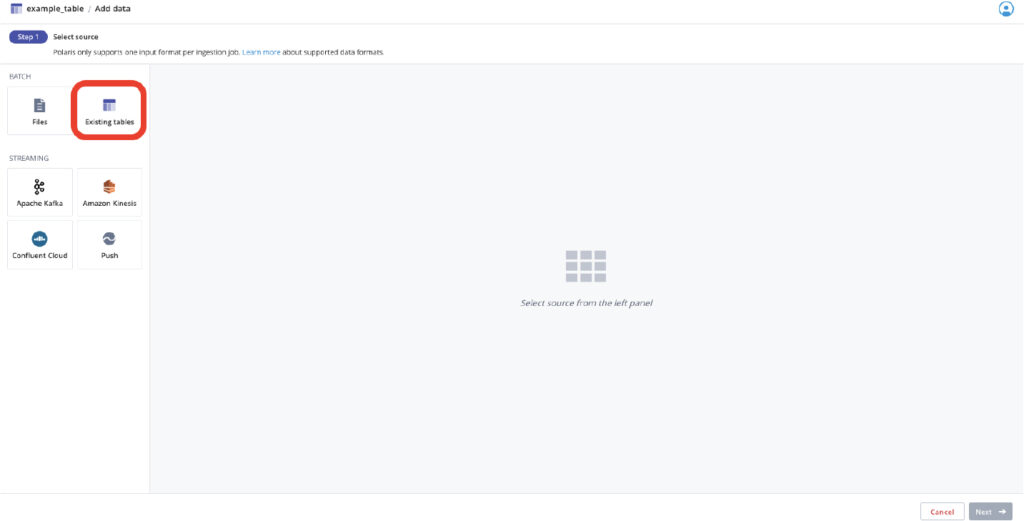
This is a really nice feature if you have a detail table, which allows for fine-grained slicing and dicing, but you also need to consider trends in the same data over time. Now you can ingest from your detail table into an aggregate table. This allows you to query the data from different perspectives without having to re-ingest the data from an external source.
Likewise, if you have an existing table which makes certain assumptions on the data that are no longer true, you can re-ingest the data from the table to itself and use SQL-based transformations to more accurately reflect the way you want to model your data.
Using table to table ingestion in Polaris not only allows you to make better use of your existing data, but also allows you to improve query performance by molding your data upon ingestion so your SELECT statement is that much simpler.
If you want to try Imply Polaris for yourself, sign up for a free trial. No credit card needed!
Lumi Loglake is now generally available in Imply Lumi
Search unstructured logs in place in your data lake
Learn MoreAgents don’t query like your detections do
A security team of four has run a major SIEM since February. Nobody on the team writes SPL. Nobody opens the console or looks at the dashboards. Every question goes through an AI agent, which writes the query,...
Learn MoreWhy You Shouldn’t Have to Delete Your VPC Flow Logs
When a security incident happens, investigators almost always start with the same questions: Which systems communicated? Where did the traffic originate? What changed before the incident? Was data exfiltrated?...
Learn More