Observability has a silo problem. Today, we’re removing another one.
Imply Lumi’s Grafana Loki integration is now in Private Preview. The same logs you’ve loaded into Lumi for Splunk are now queryable natively in Grafana using LogQL with no second pipeline, no duplicate storage, and no custom integrations.
And Grafana is just the next stop, many more ecosystems are on the way.
One dataset. Multiple ecosystems
Today, if you run Splunk and Grafana you pay for it twice:
- Two ingestion pipelines
- Two copies of data
- Two retention strategies to manage.
With Lumi underneath, one ingest feeds everything.
SPL queries from Splunk and LogQL queries from Grafana run on the same dataset, governed once, stored once, and billed once.
This changes how you can think about tools.
Load data into Lumi. Decide later how you want to query it..
Native Loki, not a plugin
The Grafana integration isn’t a custom data source plugin.
Lumi presents itself to Grafana as a Loki backend, so everything Grafana already supports just works:
- LogQL in Explore, including the visual query builder and code mode
- Log panels in dashboards
- Logs Drilldown
- Alerting on log queries
- Label browser populated from your Lumi user attributes
- Existing Loki-based integrations
Grafana users keep the workflow they already have. Admins keep the integrations they’ve already built.
Setup in minutes
From the Lumi Integrations page:
- Select the Grafana tile
- Choose your IAM key
- Map attributes to indexed labels or structured metadata

In Grafana, add a Loki data source and paste in the URL, IAM key ID, and token that Lumi provides.
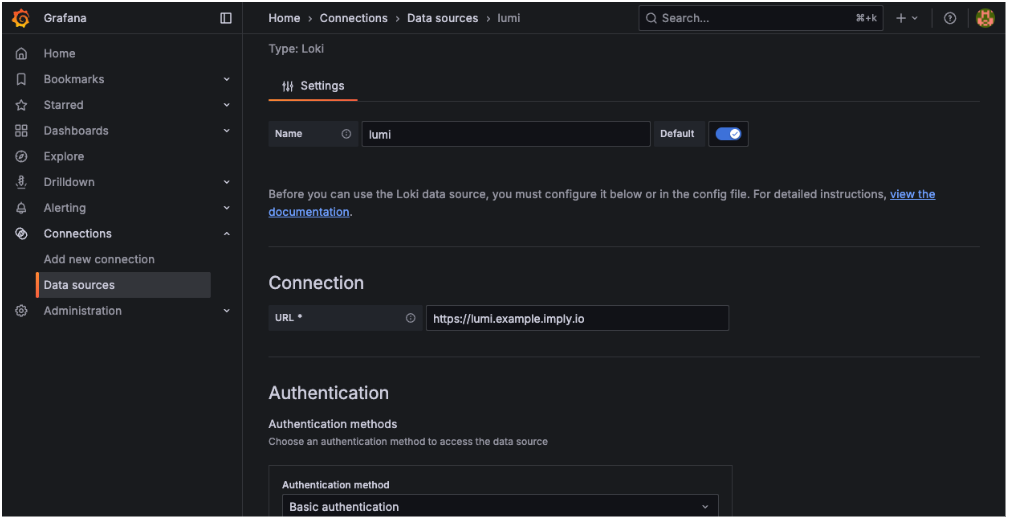
Once the connection tests successfully, run LogQL against any Lumi index you have access to:

Full setup instructions, including guidance on choosing between indexed labels and structured metadata, are in the Lumi docs.
Getting access
The Grafana integration is in Private Preview. Reach out to your Imply contact or contact us to enable it.
Why this matters
If you’re running both Splunk and Grafana today, you’re probably duplicating data and pipelines just to support both.
With Imply Lumi as your data layer, you don’t have to.
One ingest. One copy of the data. Query it from wherever you want.
 David Gee