Search your Splunk DDSS archive without restoring it
Oct 14, 2026
Nishant Kabra
Security teams often keep logs long after they have aged out of their SIEM platform’s searchable window. The data is there for investigations or audits, but accessing the data for insights can be complicated.
For Splunk Cloud customers using Dynamic Data Self Storage (DDSS), that history sits in storage they own. Splunk offers ways to access it, including restoring archived data into Splunk Enterprise or searching it through Federated Search for DDSS using SPL2.
Imply Lumi provides another option. Lumi Loglake reads DDSS archives directly in S3 and makes them searchable from Splunk using the SPL your team already knows.
Your DDSS setup keeps archiving data as usual, and searching it requires no restore into Splunk, no separate catalog to maintain, and no schema to define first.
You kept the logs. Now you need to search them.
DDSS moves expired data from Splunk Cloud indexes into customer-owned storage. For teams using S3, historical logs remain in their own AWS account after leaving Splunk Cloud’s searchable retention window, and they can become relevant months or years later.
The need for that history is real. In February 2024, CISA and its partner agencies reported that Volt Typhoon actors had maintained access in some victim environments for at least five years. A newly discovered threat can send investigators back through years of activity recorded long before anyone knew to look for it. Keeping the archive preserves that evidence, but it only helps an investigation if your team can search it.
Three ways to search a DDSS archive
Splunk documents two ways to get at DDSS data.
Restore to Splunk Enterprise. Copy the required archived buckets into a Splunk Enterprise instance and rebuild them for searching. This provides SPL access, but analysts have to wait for a restored environment and bucket preparation before they can investigate.
Federated Search for DDSS. Search the archive in S3 from Splunk Cloud using SPL2. Setup includes defining DDSS datasets, which builds a Splunk-managed catalog from your bucket, and configuring an AWS SQS queue and S3 event notifications to keep that catalog current.
Restore to Splunk Enterprise
Federated Search for DDSS
Lumi Loglake
Query language
SPL
SPL2
SPL and SQL
Dashboards, saved searches, ES detections
Rebuilt on the restore instance
Rewritten in SPL2
No changes required
Where you search
A separate Splunk Enterprise instance
A separate SPL2 search path
Your existing Splunk search bar
When the data is searchable
After every bucket is copied and rebuilt
After the crawler has cataloged it
On your first search; nothing to restore, crawl or catalog first
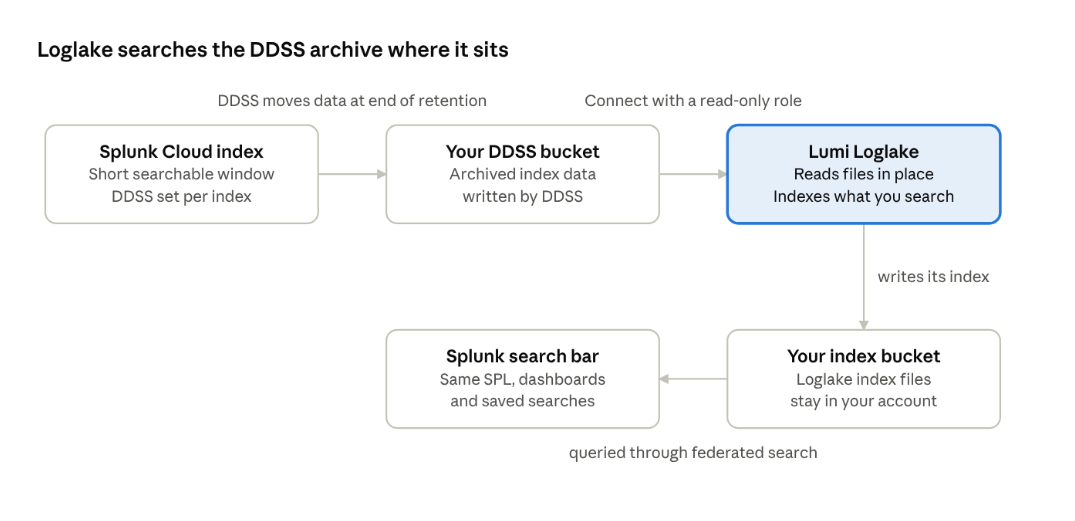
Imply Lumi with Loglake. Connect Lumi to the DDSS archive and search it through your existing Splunk interface using SPL. Lumi reads the archived files directly and indexes the data each search covers.
For teams with an investment in SPL, Lumi extends those skills and workflows to archived data. Analysts investigate from Splunk while Lumi handles access to the DDSS files underneath.
How Loglake reads a DDSS archive
Loglake understands the DDSS archive format and reads the files where Splunk wrote them, through a read-only IAM role that never modifies the source bucket.
As a search runs, Lumi indexes the data it covers and stores that index separately from the DDSS archive, where later searches can reuse it.
You do not need to process years of history before starting an investigation, because you can begin with the time range you need and expand from there. The first search over a time range does the indexing work, and later searches over the same data can reuse it for faster results.
Events keep their timestamps, hosts, sources, and sourcetypes, so analysts have the context they expect when searching Splunk data.
Connect the archive and start searching
Once your Lumi environment and Splunk federation connection are configured, add the DDSS archive under External Data in Lumi. There is no pipeline, schema or catalog to set up first.
1. Connect the bucket. Provide the S3 bucket containing your DDSS archive and an IAM role with read access. Lumi helps generate the trust policy for you and validates access before you continue.
2. Select Splunk DDSS. Choose Splunk DDSS as the file type. Lumi recognizes the archive layout on its own.
3. Preview real events. Lumi samples the archive and displays real events before you publish it, so you can confirm it is reading the expected data.
4. Publish and search. Give the archive an index name, then search that name from Splunk. Lumi indexes the data your search covers as it runs, and data DDSS adds later is found the same way.
Keep search compute separate from retention
You shouldn’t have to run search compute around the clock to keep years of logs searchable.
Lumi separates storage from compute, keeping the DDSS archive in S3 and storing the indexes it builds separately.
Searches run on on-demand worker pools that shut down after a configured period of inactivity, so you pay for compute only while they are running, with storage billed separately. Dedicated pools keep archive searches apart from other Lumi workloads.
That gives teams more control over the resources used for occasional historical searches, including investigations that need a much wider time range than day-to-day detection.
What changes for the SOC
Investigations can reach beyond the SIEM’s retention window. Analysts can include the DDSS archive in their SPL searches and investigate older activity from the Splunk interface they already use, without preparing a separate restore environment first.
Audit requests become searches against retained data. Pulling thirteen months of access logs for one account becomes a search against the archive you already keep, run from the search bar your team uses every day.
Searchable history depends less on the SIEM’s storage window. When the archive can answer questions, the searchable window only needs to cover day-to-day detection, and teams can size it to what they search often. Customers have cut security data costs by more than 70% while keeping a full year of data reachable instead of 90 days.
Agents can see the archive. An analyst knows the archive exists and can ask for a restore. An agent only sees what it can query. With the DDSS archive searchable through Lumi, agents working over MCP or SQL get live and historical data from one endpoint (more on that here).
Get started with the archive you already have
If you already archive Splunk Cloud data to DDSS in S3, you can connect that archive to Lumi without changing how Splunk writes to it. Give Lumi read access, publish the archive, and your analysts can start searching it from Splunk.
Request a demo if you would like to see Loglake run against your own DDSS archive.
Imply Lumi Virtual Tier is now generally available
Lumi Virtual Tier is generally available today on Lumi Cloud and Lumi Enterprise. Customers are already using it to keep historical data searchable without always-on infrastructure. Compute spins up when a...
Imply Lumi Loglake vs. Splunk Machine Data Lake: Your Data Lake as a Splunk Index
Splunk customers want to keep more log data for longer without paying indexer prices for it. Splunk’s answer is Machine Data Lake (MDL), now generally available on Splunk Cloud Platform. Imply Lumi Loglake...
Claude makes dashboards now, Lumi is ready for them
This week Anthropic launched Claude Dashboards in beta. You connect a data source, ask a question in plain language, and Claude writes the queries and builds the dashboard. For Imply Lumi customers, this...
 Nishant Kabra