Imply Lumi Loglake vs. Splunk Machine Data Lake: Your Data Lake as a Splunk Index
Oct 28, 2026
David Gee
Splunk customers want to keep more log data for longer without paying indexer prices for it. Splunk’s answer is Machine Data Lake (MDL), now generally available on Splunk Cloud Platform. Imply Lumi Loglake solves the same problem with a stronger architecture: logs in your own object storage show up in Splunk as indexes, searchable with SPL at hot-data speed once Lumi indexes them, with no schema to manage and no promotion job to define.
Analysts, saved searches, dashboards, and the AI agents now joining SOC workflows query Loglake data alongside everything else in Splunk, and agents can also reach it directly through Lumi’s MCP server.
Side by side: where Loglake comes out ahead
Loglake gets data in object storage into everyday Splunk search with fewer steps, at interactive speed, on any Splunk deployment:
Splunk Machine Data Lake
Imply Lumi Loglake
Getting lake data into search
Land it through MDL, narrow it with SPL2, run a promotion job, wait
Point Lumi at the bucket; search it once indexed
Interactive query speed
Raw tables are “storage-optimized, not search-optimized”; federated results arrive only when the job completes
Comparable to hot data; two to three orders of magnitude faster than MDL raw search
Query language
SPL2 for lake data; SPL only after promotion
SPL everywhere; existing searches and dashboards carry over
Splunk apps, ES, and AI agents
Run against promoted copies
Run directly on lake data; agents can also use MCP
Data already in your S3 buckets
Re-land it through MDL, or pay per scan with Federated Search
Indexed and searched in place
Splunk DDSS archives
Separate connector on Splunk Cloud, with its own catalog and SQS queue
Searched in place with SPL, from Cloud or Enterprise
Schema and catalogs
Explicit schema per analytics table; Glue table or crawler per Federated Search dataset
None to manage; every field indexed automatically
Copies needed for fast search
Raw table plus each promoted copy, each with its own retention
One LMI index, at or below gzip size for most common cloud datasets
Live and historical data
Split across the index tier and the lake
One SPL search across live data and Loglake
Pricing
Included capacity, then separate meters for retention, promotion, search count, and data scanned
Object storage plus compute for the time queries run
Splunk editions
Splunk Cloud Platform only
Splunk Cloud and Splunk Enterprise
Cisco Data Fabric, MDL, Federated Search: a workflow for every buzzword
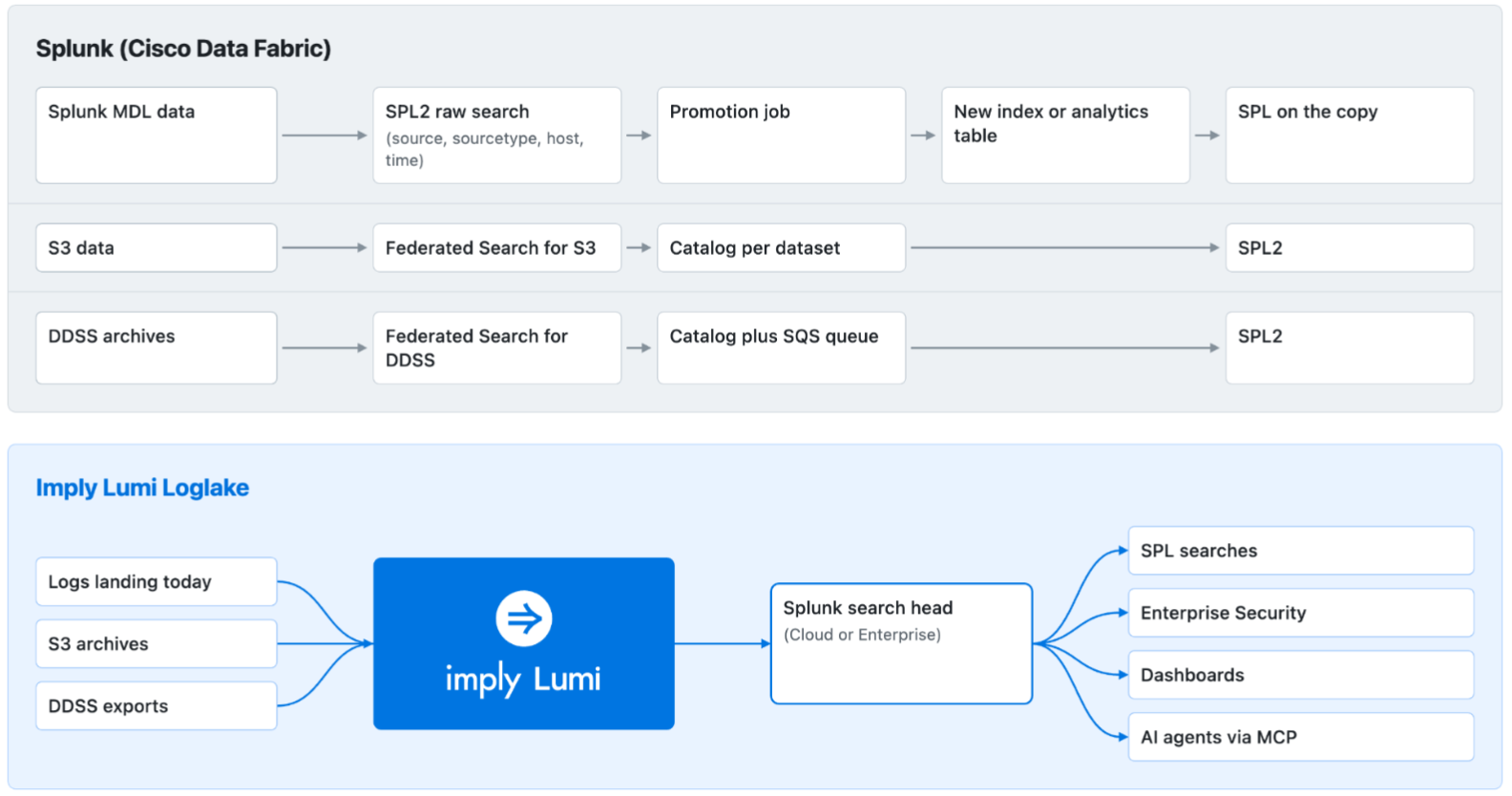
Splunk’s recent announcements span Cisco Data Fabric, Machine Data Lake, Catalog, Data Management, and Federated Search. If you have a hard time differentiating between these buzzwords, you’re not alone. Here’s how they fit together:
That’s a lot of names, and each one brings its own workflow. Data that Splunk lands goes into MDL, where you search it with SPL2 and then promote it into an index or an analytics table. Data already in S3 needs Federated Search instead, with a catalog per dataset and a bill for data scanned, because anything written outside the MDL landing workflow “is not registered as a Machine Data Lake raw table.” DDSS archives need yet another connector, Federated Search for DDSS. Each path has its own setup, query language rules, and billing. Loglake has one workflow for all of it: point Lumi at the bucket, and the data shows up in Splunk as an index you search with SPL, whether it’s an S3 archive, a DDSS export, or logs landing today.
Promote first, search later
MDL is organized around promotion. Splunk’s data strategy guidance positions raw search “for targeted validation or exploration, not repeated high-performance operational search.” To investigate, you narrow the raw table with SPL2, promote a time range into a new index or analytics table, wait, and search the copy. Splunk advises using “the smallest time range and filters that satisfy the outcome,” so an investigator has to know which slice of data matters before they can search it quickly, which is an odd prerequisite for any realistic security investigation. Promotion can’t be started through an API either, so an AI agent working an alert can’t promote the data it needs.
Loglake connects the lake to Splunk directly. Each dataset is registered as a federated index, and one SPL search can correlate it with local Splunk data:
(index=wineventlog EventCode=4625) OR (index=federated:lumi_loglake_vpcflow action=REJECT)
| eval src_ip=coalesce(src_ip, srcaddr)
| stats count dc(index) AS sources BY src_ip
| where sources=2 AND count > 50
Lumi builds the LMI index on the first query, or as files land, and from then on the dataset behaves like any other index on the search head, with no catalog entry, schema, or promotion queue.
Your DDSS archives, searchable again
Splunk Cloud customers archive expired data to Dynamic Data Self-Storage (DDSS). Getting it back has meant restoring it into Splunk Enterprise, or, on Splunk Cloud, setting up Federated Search for DDSS with SPL2, a catalog per dataset, and an SQS queue. Loglake reads DDSS archives directly from your bucket and presents them to your search head, Cloud or Enterprise, as indexes you search with SPL. Archived history becomes part of everyday search for analysts and AI agents.
Indexed at or below gzip size, with no schema to manage
Fast search in MDL means making copies. A promoted index copy “consumes index storage entitlement while it exists,” and an analytics table “requires an explicit schema.”Federated Search for S3 needs a catalog for every dataset, either an AWS Glue table “that you maintain” or a Splunk crawler, with partitions declared up front. That reintroduces the schema management that Splunk’s schema-on-read model was designed to avoid.
Loglake indexes data once in Lumi’s LMI format, which indexes every field, stays at or below gzip size for most common cloud datasets, and lives in a bucket you control. There’s no schema, catalog, or partition list to maintain, and a new source or field is searchable as soon as Lumi indexes it.
Loglake queries run on Lumi’s Virtual Tier: compute pools that start when a query arrives, read the LMI index from object storage, and return results at speeds comparable to hot data.
An indexed Loglake query runs two to three orders of magnitude faster than the same search over an MDL raw table. On data ingested and indexed in Lumi, Lumi ran 2x to 22x faster than a leading observability platform across eight SPL query types in Imply’s benchmarks. With Loglake queries that fast, Splunk apps, including Enterprise Security correlation searches, dashboards, and scheduled reports, run directly on Loglake data through the search head. Content that depends on CIM data models uses Lumi’s data model configuration.
Speed matters more as AI agents take on investigation work. One alert can turn into dozens of follow-up queries, and an agent stuck behind batch jobs or timeouts reasons over partial data. In MDL, any data an agent wasn’t handed in advance sits behind a promotion job the agent can’t start. On Loglake, agents query the lake directly, through the search head or Lumi’s MCP server.
One query language: SPL
Your detections, saved searches, dashboards, and runbooks are written in SPL. Splunk’s documentation for the new tiers is direct: “For federated datasets, raw tables, and analytics tables, you must use SPL2.” Splunk has been attempting to move customers toward SPL2 for some time, and MDL makes it a requirement for lake data.
Loglake is searched with SPL through Splunk federation, alongside your local Splunk indexes. Most existing saved searches can be pointed at Lumi by changing the index they target.
Live and historical data in one search
Splunk’s MDL guidance sends real-time work to the direct Splunk index path, and streaming promotion “does not backfill history.” A question that spans the last five minutes and the last twelve months spans two tiers.
Lumi ingests live data through HEC, Splunk-to-Splunk forwarding, and OpenTelemetry, and Loglake covers everything already in object storage, so one SPL search runs from this second back a year or more.
Cost: storage and compute, priced separately
Cisco Data Fabric includes 10 TB of MDL storage, 10 GB/day of promotion to analytics tables, and 100 federated searches a day. Past the included amounts, each access path is metered separately: retention by volume, promotion by daily volume, federated access by search count and by data scanned, and promoted copies by index entitlement. An AI agent that issues dozens of queries per alert can work through 100 federated searches within a handful of alerts.
Loglake costs come down to object storage in your account plus compute for the time indexing and queries run. The LMI index is built once and reused, so repeated hunts don’t pay to scan the same data again, whether a person or an agent runs them.
Deployment: any Splunk, your cloud
MDL is documented for Splunk Cloud Platform only. Cisco Data Fabric capacity requires the Victoria Experience on AWS, and Splunk hasn’t published a date for Splunk Enterprise support.
Loglake works with Splunk Cloud and Splunk Enterprise through Federated Search for Splunk, which both editions include. Lumi runs as Lumi Cloud on AWS, with Azure coming in early 2027, or as Lumi Enterprise in your own cloud account. Loglake reads JSON, NDJSON, CSV, plain text, HEC, and DDSS data from S3 today, with Iceberg, Delta Lake, Azure Blob Storage, and ADLS coming next.
The better architecture for logs in the lake
MDL reflects what Splunk customers already know: indexer storage is too expensive to hold everything a SOC needs. Splunk’s response adds a lake beside the indexers, connected by promotion jobs, with SPL2 for lake search and a separate meter for each access path.
Lumi Loglake makes the lake part of Splunk. Your logs stay in your object storage, indexed once at or below gzip size for most common cloud datasets, and your team and its AI agents search them with SPL at hot-data speed, next to real-time data, on Splunk Cloud or Splunk Enterprise.
Request a demo, and we’ll point Lumi at one of your existing buckets and run your saved searches against it alongside production.
Imply Lumi Virtual Tier is now generally available
Lumi Virtual Tier is generally available today on Lumi Cloud and Lumi Enterprise. Customers are already using it to keep historical data searchable without always-on infrastructure. Compute spins up when a...
Search your Splunk DDSS archive without restoring it
Security teams often keep logs long after they have aged out of their SIEM platform’s searchable window. The data is there for investigations or audits, but accessing the data for insights can be complicated....
Claude makes dashboards now, Lumi is ready for them
This week Anthropic launched Claude Dashboards in beta. You connect a data source, ask a question in plain language, and Claude writes the queries and builds the dashboard. For Imply Lumi customers, this...
 David Gee