Introducing hands-on developer tutorials for Apache Druid
Jun 06, 2023
Katya Macedo
At Imply, we are always looking for innovative ways to help you learn Apache Druid. To get you started with the Druid APIs, we’ve developed a set of interactive tutorials focused on Druid API fundamentals. These tutorials are available as Jupyter Notebooks and can be downloaded individually or as a Docker container.
For those of you not familiar with the Jupyter Notebook, it is an open source interactive web application developed by Project Jupyter.
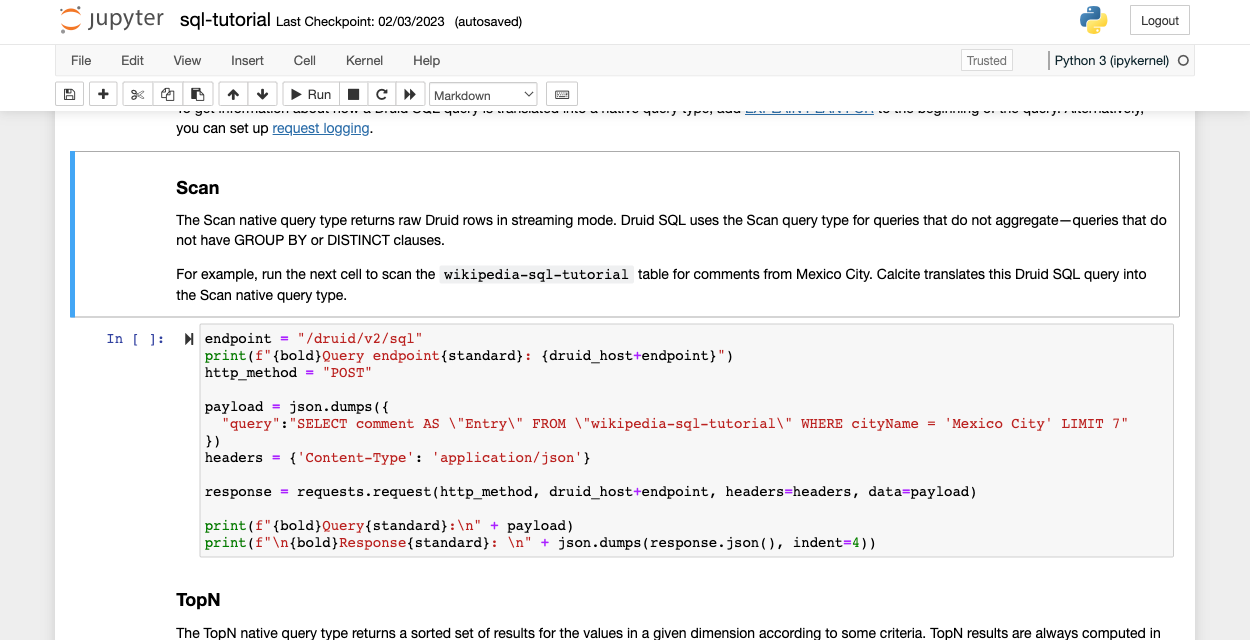
Notebooks are great for creating interactive tutorials because they combine computer code with Markdown text making it possible to call APIs and run commands from the same page. No more context switching!
Explore the notebooks
The following notebook tutorials work with the Druid 25.0 release and later.
Learn the basics of the Druid API
This notebook introduces you to the basics of the Druid REST API. You’ll learn how to retrieve basic cluster information, ingest data, and query data.
This notebook provides a quick introduction to the Druid Python API, a Python wrapper around the Druid REST API. Although the Druid Python API is primarily intended to help with the Jupyter-based Druid tutorials, you can use it in your own notebooks, or in a regular Python program.
You can run the notebooks locally on your system or in Docker using the Docker Compose file. The Docker Compose file provides a custom Jupyter container that includes all of the Jupyter-based Druid tutorials and prerequisites. In addition to the Jupyter container, you can run the containers for Druid and Apache Kafka.
Jupyter in Docker requires that you have Docker and Docker Compose. We recommend installing these through Docker Desktop.
Docker Compose setup
Ready to hit the ground running? This method gets you started with the tutorials in no time!
You can run the containers for Jupyter and Druid using the Docker Compose file provided in the Druid GitHub repo.
Alternatively, you can clone the apache/druid repo and access the files in druid/examples/quickstart/jupyter-notebooks/docker-jupyter.
In the same directory as docker-compose.yaml, start the application with the following command:
DRUID_VERSION=26.0.0 docker-compose --profile druid-jupyter up -d
The first time you run the compose environment, it can take several minutes to load.
Tip: You pass in the version of Druid as an environment variable that gets read into the docker-compose file. When new versions of Druid come out, update the variable when you launch the tutorials. For example, DRUID_VERSION=27.0.0
Another benefit of using Docker Compose is that you can run different combinations of services, based on what you have specified in the profile flag. For example, if you already have Druid running locally, you can just run the Jupyter container as follows:
We’re continuously adding more tutorials to our library. If you have an idea for your own notebook tutorial, please make a contribution! We’ll work with you to merge it to the repo. In the meantime, don’t be a stranger, check out our Jupyter Notebook-based Druid tutorials in the apache/druid repo and share your feedback.
Other blogs you might find interesting
No records found...
Oct 14, 2026
Search your Splunk DDSS archive without restoring it
Security teams often keep logs long after they have aged out of their SIEM platform’s searchable window. The data is there for investigations or audits, but accessing the data for insights can be complicated....
Claude makes dashboards now, Lumi is ready for them
This week Anthropic launched Claude Dashboards in beta. You connect a data source, ask a question in plain language, and Claude writes the queries and builds the dashboard. For Imply Lumi customers, this...
Lumi Lounge Recap: 3 Takeaways from Splunk .conf26
The Imply Lumi Lounge sat directly across the street from Splunk .conf26 and reached venue capacity on both days. Digital signs around the Colorado Convention Center pointed attendees our way with a simple...
 Katya Macedo