 Rick Jacobs
Sep 13, 2026
Lumi Loglake is now generally available in Imply Lumi
Search unstructured logs in place in your data lake
Learn MoreIn today’s data-driven world, managing data cost-effectively is crucial for organizations to gain insights and make informed decisions. AWS S3 (Simple Storage Service), often becomes the popular choice for storing data files because of it’s accessibility, scalability and pay-as-you-go pricing model. However, when it comes to real-time analytics and fast data querying, Apache Druid shines as a high-performance database. This often creates a scenario where organizations need to transfer their data from S3 to Druid. This blog briefly explains the rationale behind storing files in S3 and the advantages of migrating this data to Apache Druid and outlines the migration process including the required code.
The goals of this blog are to:
Amazon S3 has become a cornerstone for organizations dealing with large datasets. By adopting a pay-as-you-go model, S3 provides an affordable solution for storing a vast amount of data, making it an attractive option. It allows organizations to scale their storage requirements up or down, ensuring they only pay for what they use. S3’s security features ensure data remains protected against unauthorized access. Data housed in S3 can be accessed from anywhere at any time, providing a flexible data storage solution. S3 also offers simplified management through its intuitive interface and organization features, making data management a straightforward task for administrators.
Apache Druid is engineered to handle real-time analytics on large datasets, seamlessly. One of the notable advantages is the real-time data ingestion capability of Druid, which allows organizations to analyze data on-the-fly as it’s being ingested. Scalability is an inherent feature of Druid; it easily scales to handle increasing data loads without compromising performance, ensuring that as the data grows, the performance remains consistent.
Druid is purpose-built to support quick data aggregation and filters, which is important for timely decision-making. The query performance in Druid is superior thanks to its column-oriented storage, and liberal automatic indexing, making data querying significantly faster compared to traditional databases even with thousands of concurrent users. It is not unusual for organizations to store less used or archived data in S3 and ingest that data into Druid to enrich the database data for more complete analysis, as needed or to offload data from S3 that is better suited to an analytics database.
To execute the steps outlined in this blog, you will meet the following prerequisites:
The process of migrating data from S3 to Apache Druid can be streamlined through a series of well-defined steps, ensuring a smooth transition and integrity of data throughout the migration.
The script below first establishes a connection to the AWS S3 service. It initiates this by loading the necessary AWS credentials from a `config_aws.json` file through the `load_aws_keys` function. Once these credentials are successfully fetched, the `authenticate_aws` function uses them to authenticate and produce an S3 client using the `boto3` library. With the S3 client in created, the `download_from_s3` function gets activated to retrieve a specified file from a predetermined S3 bucket and save it to a local directory. If any issues, such as missing credentials or download errors, arise during this procedure, the script outputs relevant error messages. Once the data fetching is concluded, the `create_ingest_spec` function from the `s3_ingest` module is called, to ingest the downloaded data. The ingestion code is described and shown in the following section.
import boto3
import json
from s3_ingest import create_ingest_spec


def load_aws_keys(file_path='config_aws.json'):
	"""Load AWS configuration from a JSON file."""
	try:
    	with open(file_path, 'r') as file:
        	return json.load(file)
	except FileNotFoundError:
    	print(f"Error: The file {file_path} does not exist.")
    	return None
	except json.JSONDecodeError:
    	print(f"Error: The file {file_path} is not a valid JSON file.")
    	return None


def authenticate_aws(aws_keys):
	"""Connect to AWS S3 using the provided configuration."""
	if not aws_keys:
    	print("Error loading AWS keys.")
    	return None

	aws_access_key_id = aws_keys.get('AWS_ACCESS_KEY')
	aws_secret_access_key = aws_keys.get('AWS_SECRET_KEY')

	if not aws_access_key_id or not aws_secret_access_key:
    	print("AWS keys missing from the config file.")
    	return None

	return boto3.client('s3', aws_access_key_id=aws_access_key_id,
                    	aws_secret_access_key=aws_secret_access_key)


def download_from_s3(s3_client, bucket, key, filename):
	"""Download a specified file from an S3 bucket to a local directory."""
	try:
    	s3_client.download_file(bucket, key, filename)
    	print(f"{key} downloaded from {bucket} to {filename}")
	except Exception as e:
    	print(f"Error downloading file from S3: {e}")


def get_data():
	aws_keys = load_aws_keys()
    s3_client = authenticate_aws(aws_keys)
	if not s3_client:
    	return

	BUCKET_NAME = 'rjbucketaws'
	FILE_KEY = 's3_data.csv'
	LOCAL_PATH = 'data/s3_data.csv'

	download_from_s3(s3_client, BUCKET_NAME, FILE_KEY, LOCAL_PATH)


if __name__ == "__main__":
	get_data()
	create_ingest_spec()
Note that the load_aws_keys function uses configs_aws.json to store AWS S3 connection data.
Below is an example of the `configs_aws.json` that stores the database configuration details that are used in the script above.
{
  "AWS_ACCESS_KEY": "XXXXXXXXXXXXXXXXXXXX",
  "AWS_SECRET_KEY": "XXXXXXXXXXXXXXXXXXXXXXXXXXXXXXXXXXXXXXXX"
}The script below generates an ingestion specification for Druid. Within the `construct_ingestion_spec` function, the script creates a detailed ingestion blueprint based on the specified data source, formatted as CSV. The script then relays this specification to a Druid instance using the `post_ingest_spec_to_druid` function. This function employs the `requests` library to dispatch the spec via an HTTP POST request. In the event of any hitches or HTTP errors during this interaction, the script notifies the user. For ease of use, the script provides default values for the data source, directory, and Druid host. However, these defaults can be adjusted as necessary when invoking the `create_ingest_spec` function.
import json
import requests


def construct_ingestion_spec(DATA_SOURCE, BASE_DIR):
	"""Construct the ingestion spec based on the data source and directory."""
	return {
    	"type": "index_parallel",
    	"spec": {
        	"ioConfig": {
            	"type": "index_parallel",
            	"inputSource": {
                	"type": "local",
                	"baseDir": BASE_DIR,
                	"filter": f"{DATA_SOURCE}.csv"
            	},
            	"inputFormat": {
                	"type": "csv",
                	"findColumnsFromHeader": True
            	}
        	},
	        "tuningConfig": {
            	"type": "index_parallel",
            	"partitionsSpec": {
                	"type": "dynamic"
            	}
        	},
        	"dataSchema": {
            	"dataSource": DATA_SOURCE,
            	"timestampSpec": {
                	"column": "CREATED_AT",
                	"format": "auto"
            	},
            	"dimensionsSpec": {
                	"useSchemaDiscovery": True,
                	"dimensionExclusions": []
            	},
            	"granularitySpec": {
                	"queryGranularity": "none",
                	"rollup": False,
                	"segmentGranularity": "hour"
            	}
        	}
    	}
	}


def post_ingest_spec_to_druid(spec, DRUID_HOST):
	"""Post the ingestion spec to Druid and return the response."""
	headers = {'Content-Type': 'application/json'}
	response = requests.post(DRUID_HOST, json.dumps(spec), headers=headers)
    return response


def create_ingest_spec(DATA_SOURCE='s3_data',
                   	BASE_DIR='/Users/rick/IdeaProjects/CodeProjects/druid_data_integrations/data',
                   	DRUID_HOST='http://localhost:8081/druid/indexer/v1/task'):
	"""Create the ingestion spec and post it to Druid."""
	spec = construct_ingestion_spec(DATA_SOURCE, BASE_DIR)
	print(f'Creating .csv ingestion spec for {DATA_SOURCE}')

	try:
    	response = post_ingest_spec_to_druid(spec, DRUID_HOST)
    	response.raise_for_status()
    	print(response.text)
	except requests.HTTPError:
    	print(f"HTTP error occurred: {response.text}")
	except Exception as e:
    	print(f"An error occurred: {e}")


if __name__ == "__main__":
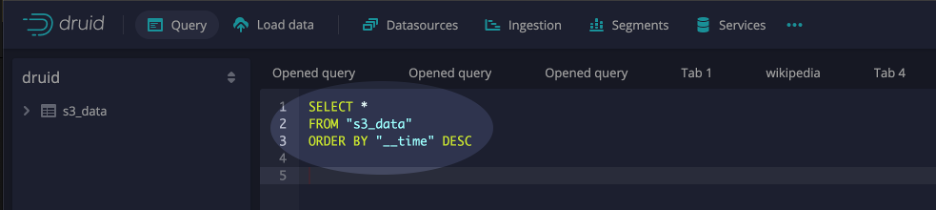
create_ingest_spec()The final step in the migration process is verification. Post-migration, it’s important to verify that all data has been correctly transferred and is accessible for querying in Druid. This step ensures that the migration process has been successful and the data is ready for analysis. To verify that the data was ingested, select the query interface from within the Druid console and execute SQL similar to the example below:
AWS S3 has established itself as a reliable and scalable solution for data storage. However, it is often necessary to move data from S3 into an analytics database. For real-time analytics, instantaneous data querying and high numbers of concurrent access Druid is perfect. This blog outlines how to accomplish such a migration and provides the code to do so.
By integrating these two platforms, organizations can harness the best of both worlds: durable storage from S3 and lightning-fast, real-time data querying from Apache Druid. The combination not only streamlines data management but can also unlock deeper insights, driving more informed business decisions for internal stakeholders and high-performance analytical applications for customers.
Lumi Loglake is now generally available in Imply Lumi
Search unstructured logs in place in your data lake
Learn MoreAgents don’t query like your detections do
A security team of four has run a major SIEM since February. Nobody on the team writes SPL. Nobody opens the console or looks at the dashboards. Every question goes through an AI agent, which writes the query,...
Learn MoreWhy You Shouldn’t Have to Delete Your VPC Flow Logs
When a security incident happens, investigators almost always start with the same questions: Which systems communicated? Where did the traffic originate? What changed before the incident? Was data exfiltrated?...
Learn More